
Stop drawing the wallet. Compose it.
A crypto wallet mockup template in a design tool is still a drawing: every number, icon and percentage on it is yours to type, align and check, and again after each change. A wallet simulator draws the same screen from a form. Here is what each route really takes, and when drawing is still the better choice.
No account · a DEMO mark on the screen · 12 changes at a time
The same screen, two ways to get it
By hand, in a design tool
A picture of a wallet
- Numbers typed into text boxes, frozen the moment you stop typing.
- Every total and percentage added up by you, again after each change.
- A status bar, icons and proportions to draw, or find in a template, and align yourself.
- A still image: nothing follows the market when the camera rolls.
Each change sends you back into the file.
In My Larp Wallet
A wallet mockup that runs on your phone
- A form: pick the tokens, type the quantities, name the wallet.
- Prices that follow the market on the five built-in tokens; the rows and the total add themselves up.
- Your phone’s own resolution and status bar, because it runs on the phone.
- Full screen from your home screen, at your own address.
A form, not a file. Change a number, and the screen follows.
What drawing a wallet screen by hand really takes
None of it is hard on its own. What costs is that a wallet screen is made of small measured details and of arithmetic, and a drawing keeps neither for you. Six things to get right, each one measured or tested in a guide on this site:
The status bar
Apple publishes safe areas, not the geometry of the glyphs. On an iPhone 14 Pro the status bar is drawn in a 54 pt box inside a 59 pt safe area, and using 59 pushes every glyph down: the most common error in a hand-built status bar. The Wi-Fi mark is two filled crescents and a wedge, not three stroked arcs; the battery is a filled pill with the number knocked out of it.
In detail: iPhone status bar height and size, measured.
Token icons
One size for every list row, 32 to 40 pt, clipped to a circle, with a plate behind any monochrome logo so it does not vanish on a dark or a light theme. Mixed shapes in one list read as misalignment, not variety.
In detail: Crypto token icons: sizes, shapes and the traps.
Number formats
Wallets print five decimals under a thousand units and two above. Bitcoin divides into eight decimals, and a round quantity such as 0.25 BTC reads as typed, because a real purchase is an amount divided by a price, minus a fee. Every row follows these rules.
In detail: Bitcoin wallet simulator: a BTC screen that reads right.
Totals and percentages that add up
Each row is the quantity times the token’s price. The total is the sum of the rows plus the cash row. The day’s percentage is the dollar change divided by the balance before that change, not by the total. And the rows are sorted by value, largest first. Change one quantity, and the row, the total, the percentage and perhaps the order change with it.
In detail: How to make a crypto portfolio mockup that adds up.
The layout and its proportions
A wallet home screen is four stacked blocks: a tab rail, a balance header, an optional cash row and a token list, held together by a few repeated gaps and a one-pixel card edge that is lighter at the top. Get the gaps wrong and the screen reads as almost right, without anyone locating the fault.
In detail: Anatomy of a crypto wallet portfolio screen.
Every change, and every take
A drawing is exact on the day it is made. A new quantity, a price that moved or a second version for another slide sends you back into the file. On video, a still price column reads as a static image once the clip runs longer than two seconds.
In detail: Why the prices have to move on video.
What composing it changes
The same wallet from one form: every quantity at zero, then filled from one dataset. Nothing on either screen was drawn by hand.
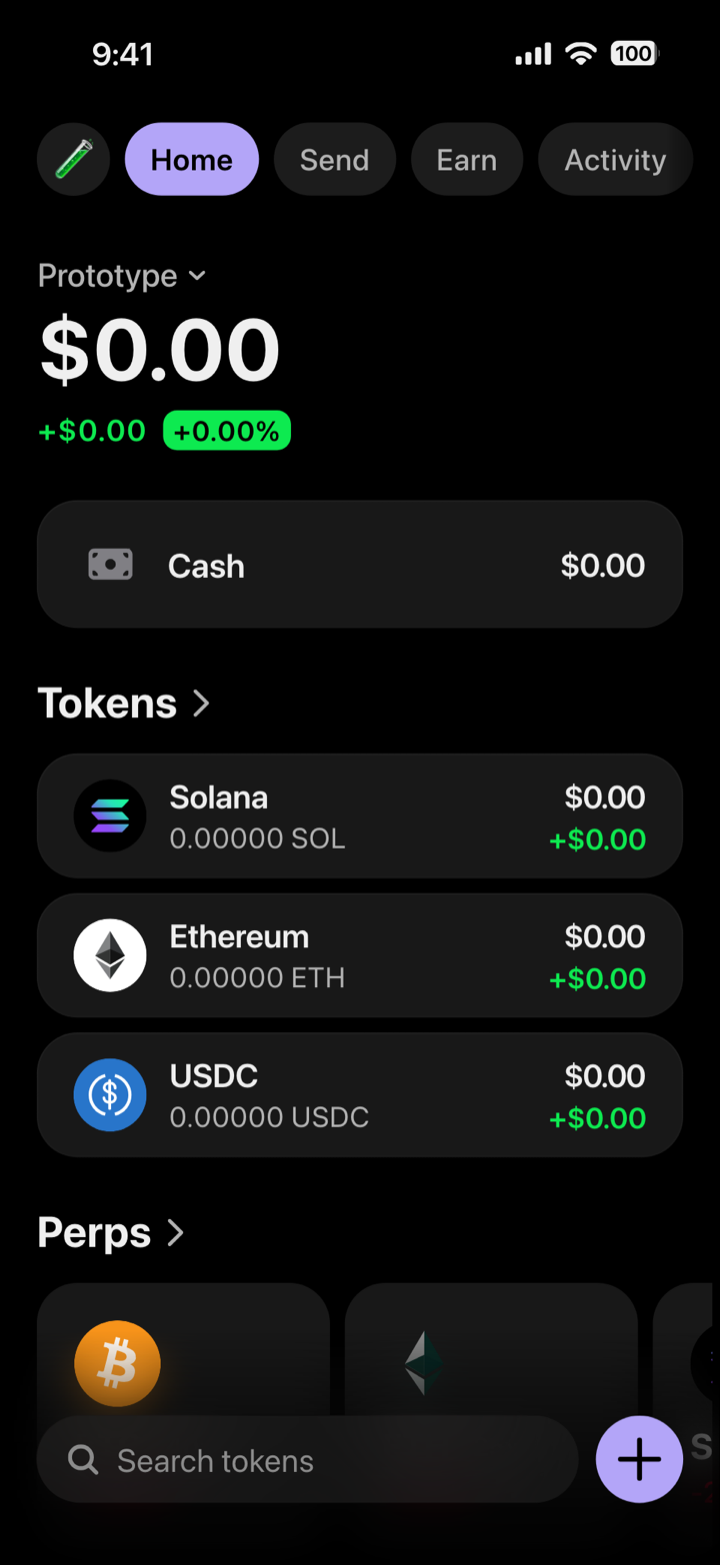
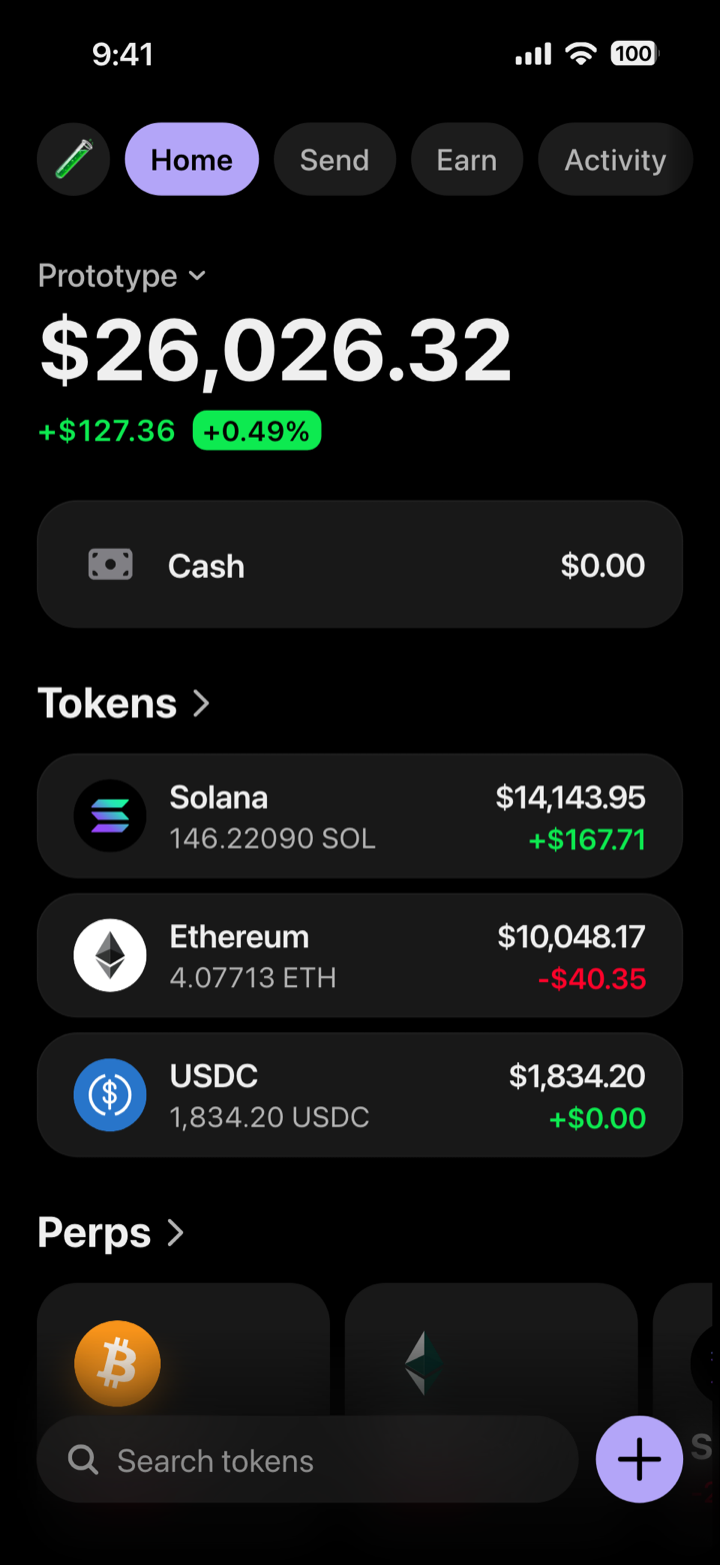
A mockup, not a wallet: composed in My Larp Wallet. It holds no funds and connects to no blockchain. The time, signal and battery at the top of these pictures are drawn by our renderer; on your phone, the wallet leaves that band to the phone's own status bar.
The arithmetic is done for you.
Each row is quantity times price, the rows add up to the total, and the day’s change follows from them. You can still type a total by hand; if you do, keeping it true is your job again.
The prices move where they should.
The five built-in tokens (SOL, ETH, BTC, HYPE and USDC) follow the market while the phone is online. A custom token keeps the price you typed, for figures that must hold between takes.
The phone draws its own status bar.
The wallet runs full screen and leaves the top band to the phone: the clock, signal and battery are the phone’s own, at its own resolution.
The marks come with the tokens.
Solana, Ethereum, Bitcoin, Hyperliquid and USDC are traced from real screenshots. Any other token takes an uploaded square image or a letter badge in the colour you choose.
The order stays yours.
Rows keep the order you set and move with arrows; nothing re-sorts behind your back. After a big change, check that the largest value still sits on top.
There is no file to keep.
No export: you take the screenshot or the recording on the phone. What lands in the picture.
When a design tool is the right choice
Often. A wallet simulator draws one kind of screen in one design; a design tool draws anything. Draw it when you need:
- The screens of your own wallet app. Your layout, your components, your brand; and for the store listing, screenshots of your build. Figma app mockup vs real screenshot: which one to use.
- Anything that is not a wallet’s home screen or a token page. Onboarding, send and swap flows, settings: here, the screens behind the tabs show fixed sample content.
- A layout of your own. My Larp Wallet has one design: you change its content, name, colour and labels, not its layout. Its default avatar and search text point to a real wallet app, whose home screen the layout follows; replace them first, and label the screen as illustrative.
- A picture larger than a phone. A composed screen comes out at your phone’s resolution; a poster or a print wants a file drawn at that size.
Compose it when the screen is a wallet’s home screen and the job is a video, a pitch, a demo, a deck, a class or a design review: the six jobs, and what each one needs. Building a wallet app? Where a composed wallet screen fits, and where it does not.
Access is personal (terms, section 4) and our terms do not mention business use: for a company or a client project, write to contact@mylarpwallet.com first.
Questions
Is My Larp Wallet a template?
Not a file you edit. It is a wallet that draws itself from what you type in a form: tokens, quantities, the wallet’s name, colour and labels. You change its content, not its layout.
Can I get the screen as an image file?
No, there is no export. Open the wallet on your phone and take the screenshot or the screen recording there, at the phone’s own resolution.
Do the totals really add up by themselves?
Yes. Each row is the quantity times the price, the total is the sum of the rows plus the cash row, and the day’s change follows from the rows. Both can be overridden by hand; then the arithmetic is yours to keep.
Should I design my own wallet app’s screens this way?
No. It has one design; your own screens belong in your design tool, and your store listing shows your build. Before launch, a composed screen can serve a pitch or a concept test, labelled as illustrative.
Can I try it before paying?
Yes, on the demo: no account, a DEMO mark on the screen, and 12 changes at a time, kept in your browser.
Compose one before you draw one.
The demo runs the same wallet in your browser, at live prices: you change the quantities, the wallet’s name and the cash row. Your own wallet adds every other setting.
Try the free demoNo account · a DEMO mark on the screen · 12 changes at a time
My Larp Wallet makes interface mockups. It is not a wallet: it holds no funds and reads no blockchain. Every quantity is typed in; only the market prices of the five built-in tokens are real. Presenting a screen as a real balance or an account statement, to obtain money or someone’s trust, is against our terms.
Pages by job: Creators · Crypto wallet app builders · Demos, decks and classes · All six jobs